![neurotone-primary-logo-CMYK-1.jpg]](https://support.neurotone.com/hs-fs/hubfs/neurotone-primary-logo-CMYK-1.jpg?height=40&name=neurotone-primary-logo-CMYK-1.jpg)
Applies to: Provider certification and practice certification
Before you start
For provider certification, you need a Pro Portal account. Any member of your practice can certify.
For practice certification, you need to be the owner or an admin of your practice.
Provider certification
You earn a provider certification by passing an assessment.
Open your certification page
If you are an owner or an admin, select Certification under Admin in the left navigation.
If you are not an owner or an admin, select your name in the top right, then select Get certified.
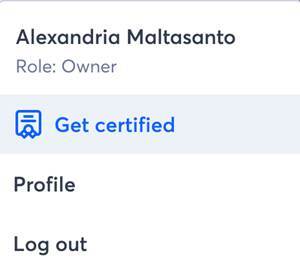
Every member of your practice can reach their own certification page from the profile menu.
Take an assessment
- Review the card for the certification you want. Each card shows the format: 15 - 20 minutes and 40-50 questions.
- Select helpful resources to review the study materials before you begin.
- Select Take the Lace Pro test or Take the Tinnitus Pro test.
- Complete the assessment.
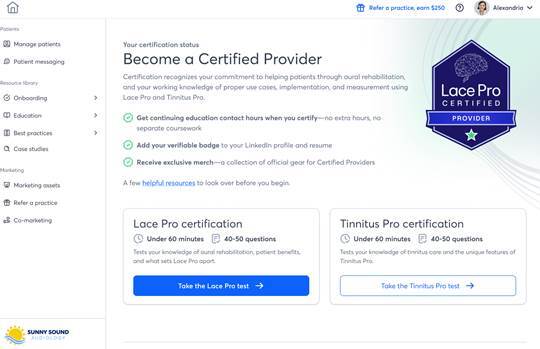
The certification cards on the Become a Certified Provider page.
Pass mark and retakes
You pass at 80%. Every assessment in the program uses the same 80% pass mark.
There is no waiting period between attempts. If you do not pass, you can take the assessment again as soon as you are ready.
What happens when you pass
Your certification page shows Certified on with the date you passed. From there you can select Add to LinkedIn or Get certificate to download your certificate.
You also receive an email inviting you to claim your digital badge. See How to accept your certification badge.
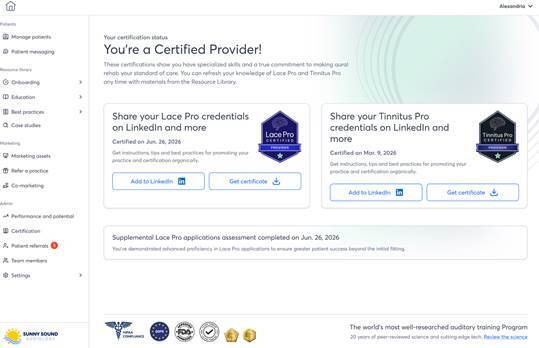
Your certification page after you pass, with a card for each certification you hold.
Practice certification
There is no general practice test. Your practice applies, and then Neurotone calculates its level.
Apply for certification
- Select Certification under Admin in the left navigation.
- Select Apply for certification.
- Read the confirmation, then select Let’s go.
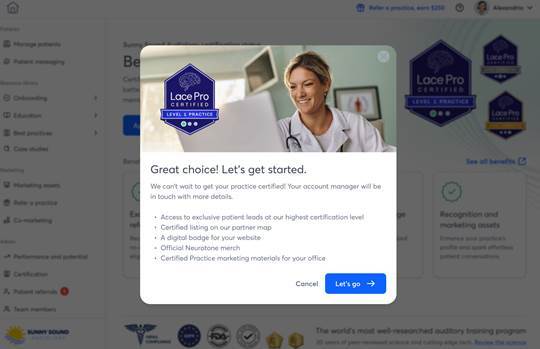
The confirmation you see after selecting Apply for certification.
Your account manager is notified and will be in touch. Your practice moves into an applied state and your team table appears.
Applying is not the same as being certified. It is the step that starts the process.
What counts as a license
A license is a new patient you add from the Pro Portal. Licenses are free on the unlimited plan.
Your practice’s average is a rolling 30-day figure. It counts every provider who can prescribe Lace Pro licenses, whether or not they are certified. A provider who has not certified still counts toward your average.
Lace Pro Level 1
More than 60% of the people in your practice hold a Lace Pro provider certification. This counts everyone in your practice, including team members who cannot prescribe Lace Pro.
|
People in your practice |
Certifications needed |
|
1 |
1 |
|
2 |
2 |
|
3 |
2 |
|
4 |
3 |
|
5 |
4 |
|
6 |
4 |
|
7 |
5 |
|
8 |
5 |
|
9 |
6 |
|
10 |
7 |
Lace Pro Level 2
Your practice meets Level 1, and averages at least 3 licenses per prescribing provider per month. If you are the only prescribing provider at your practice, you need at least 5 per month.
Lace Pro Level 3
Your practice meets Level 2, averages at least 5 licenses per prescribing provider per month, and one provider passes Beyond the Fitting: Lace Applications Assessment.
Only one provider needs to pass it. The assessment covers deeper Lace Pro knowledge, patient use cases, and the conversation with patients who decline hearing aids. A provider takes it from their own certification page, and passing it does not create a new provider certification.
Tinnitus Pro
Tinnitus Pro practice certification has one level. There is no license requirement. The number of Tinnitus Pro certifications you need depends on the size of your practice.
|
People in your practice |
Certifications needed |
|
1 |
1 |
|
2 |
2 |
|
3 |
2 |
|
4 |
3 |
|
5 or more |
4 |
See the gap to your next level
Your team table lists every member with their role and certification status. Use it to see who has certified and who has not. See How to invite your team to get certified.
When your status updates
Neurotone recalculates your practice’s status against your license data on a regular cycle. Your updated level and badge appear the next time you sign in after that calculation finishes.
If your practice falls below its level
Nothing is removed automatically. Your practice does not lose its level or its badge on its own, and you will not receive an automated warning. If your practice stays below its current level’s requirements, your account manager reaches out to work through it with you.
Troubleshooting
You passed but your certification card still shows you as not certified.
Sign out and sign back in. Your certification appears on your next sign-in after your result is recorded.
Your practice meets the numbers but its level has not changed.
Practice status updates on a calculation cycle, not immediately. Check again after your next sign-in. If the numbers have been met for more than one cycle, contact your account manager.
A provider is missing from your team table.
The table lists the members of your practice. Add the person under Team members in the left navigation, and they will appear in the table.
You cannot find Certification in the left navigation.
The Certification entry under Admin is only visible to owners and admins. To reach your own certification page, select your name in the top right, then select Get certified.