![neurotone-primary-logo-CMYK-1.jpg]](https://support.neurotone.com/hs-fs/hubfs/neurotone-primary-logo-CMYK-1.jpg?height=40&name=neurotone-primary-logo-CMYK-1.jpg)
Applies to: Provider certification and practice certification
Before you start
You need access to the email address on your Pro Portal account. Badges are issued through Credly, so you also need a free Credly account to hold your badge.
When your badge is issued
Your provider badge is issued as soon as you pass an assessment.
Your practice badge is issued when your practice reaches a level. Each level has its own badge.
Claim your badge
- Open the email inviting you to accept your badge. It comes from Credly, not from Neurotone.
- Select the link in the email.
- Sign in to Credly, or create an account if you do not have one.
- Accept the badge.
Your badge is now yours to share. See How to share your certification badge.
There is no deadline. Your badge waits until you claim it.
Your privacy settings
Your badge is public by default, which is what makes it verifiable when you share it. You can change that in your badge settings at any time. A private badge will not display on your website or your LinkedIn profile.
Provider badges
Your provider badge is yours. It goes to the email address on your Pro Portal account, and it stays with you.
You get one badge for each certification you hold. Lace Pro certification and Tinnitus Pro certification each have their own.
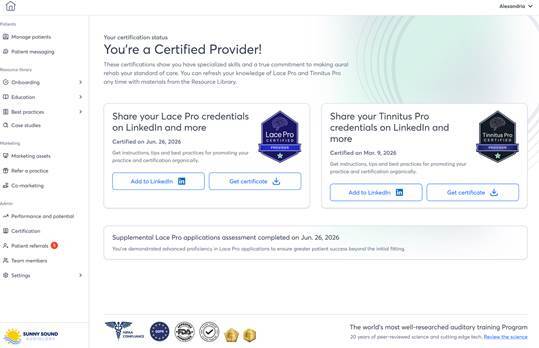
Your certification page shows the date you certified for each credential you hold.
Practice badges
Your practice badge works differently. It belongs to your practice as an organization, not to one person.
The person who selected Apply for certification claims it. The invitation goes to that person, and they need to accept it for your practice’s badge to become active. Once it is claimed, other people at your practice can be given access to use it.
If your practice reaches a new level, a new badge is issued for that level and claimed the same way. Your earlier badges stay valid as a record of what your practice has earned.
Troubleshooting
The email never arrived.
Check your spam folder first. If it is not there, confirm the email address on your Pro Portal account is correct, then contact Neurotone support. (Fix with Neurotone.)
The email went to the wrong address.
Update the email address on your Pro Portal account, then contact Neurotone support to have the badge reissued to the right address. (Fix with Neurotone.)
The link expired.
Contact Neurotone support and ask for the badge to be reissued. (Fix with Neurotone.)
You already have a Credly account under a different email address.
You can add the address the badge was sent to as a second address on your existing account, which brings the badge into the account you already use. (Fix with Credly.)
The person who claimed your practice badge has left the practice.
Contact your account manager. Your practice’s badge can be reissued so that someone still at your practice holds it. (Fix with Neurotone.)
The name on your badge is wrong.
Correct your name in your Pro Portal profile, then contact Neurotone support to have the badge reissued. Changing your name in Credly does not change the badge. (Fix with Neurotone.)
The certification or level on the badge is wrong.
Contact Neurotone support. Badges are issued from your certification record, so the record needs to be corrected first. (Fix with Neurotone.)